Billy is a custom talking fish built around a small Raspberry Pi computer. A microphone hears questions, local software chooses or writes a reply, speakers play it, and motors move the mouth and body. A camera can notice someone facing Billy. The small e-paper screen displays a name tag, words, or sleep status.
You do not need to program Billy to use him. Begin with sections 1 and 2. Sections 4 through 8 explain the browser controls. Wiring, internal repair, and software updates are for the person maintaining the unit.
What comes from where
Part
What it does
Fish and plaque
Moving mechanism and enclosure. Keep fingers and packing material clear.
Camera and microphone
Detect attention and hear speech. The camera detects faces; it does not identify people.
Speakers and e-paper
Sound and a low-power text display. An e-paper image can remain after power is removed.
Raspberry Pi and microSD
The computer and its installed software. Do not erase or re-image the supplied card.
Two power paths
The Pi has a suitable USB-C supply. Motors use a separate protected supply and switch. Follow the labels on this unit.
Developer UI
A webpage on Billy used for volume, status, tests and content edits. It is not a phone app or an Internet website.
Offline conversation and local networking
Installed speech and answer models run on the Pi, without Internet access for ordinary conversation. For the controls, a phone or computer connects directly to Billy’s private service Wi-Fi. No venue router, Wi-Fi password or Internet connection is needed. [R1, P1]
Prepared responses can begin much sooner than newly generated answers. Give Billy time to finish rather than repeating the question immediately. Generated answers can be wrong, even about Billy himself; this is a novelty project, not an authoritative adviser.
For help, send the symptom, what happened just before it, and a photo of the status/error message. Do not send passwords, secret files, or recordings of other people without permission.
1 Start here
This manual is for the operator and maintainer of the Raspberry Pi Billy Bass: local conversation, moving mouth and body, camera engagement, microphone, speakers, e-paper name tag, and the browser developer console. Start with the daily checklist. Use the diagnostic sections to isolate one fault at a time.
Edition 24 September 2026. Instructions combine the installed Pi configuration checked on 24 September 2026 with the project source. Future releases can differ. Before changing hardware or software, identify the running release in Section 3 and compare its configuration. Wiring diagrams describe electrical connections, not a photograph or proof of the assembled harness.
Task
Go to
Use Billy with visitors
Sections 2–3
Find a control or test one function
Sections 4–8
Wire or replace a component
Sections 9–11
Fix a failure
Section 12
Back up or update software
Sections 13–14
2 Daily operation
Unpacking and first placement
Lift Billy by the plaque or enclosure, not the head, tail, wires, camera or display. Remove all loose packing from the movement area.
Set the unit on a stable indoor surface or use its intended secure mounting. Keep it dry, ventilated, and away from a table edge. Do not restrain the moving head or tail.
Find the supplied, labeled Pi power connection and motor-power control. If either is unlabeled, loose, or damaged, contact Thomas before connecting it.
Keep the preinstalled microSD card in place. Do not follow a generic Raspberry Pi imaging tutorial to set up this assembled unit.
Optional service Wi-Fi from your phone
No venue network is needed. Billy runs offline. Use the service hotspot only when you want the controls.
With Billy powered on, open your phone’s Wi-Fi settings and join BillyBass-Service using the password on the private shipping label.
If your phone says “No Internet,” choose Stay connected or Use without Internet. This is expected.
Open a normal browser and enter http://10.42.0.1:8080. Include http and port 8080; no app installation or Internet login is needed.
If the page will not open, check that Wi-Fi stayed on BillyBass-Service. Temporarily turn off a VPN or automatic cellular switching if needed. Restore your phone settings afterward.
If Billy is sleeping, say Hey wake up before running tests. The console can remain reachable during sleep while most actions are blocked.
When finished, return your phone to its normal Wi-Fi. Billy continues working offline.
The hotspot is a normal Wi-Fi access point that phones can join directly. It does not route users to the Internet or to another connected network. Share its password only with trusted operators. [P6]
Before visitors arrive
Check that the case is secure, the mouth/body can move freely, the speaker leads are insulated, and no connector is loose. Keep the motor-power switch accessible.
For an already accepted assembly, connect the Pi’s proper USB-C supply. Leave motor power off while checking readiness. After a repair, use the staged procedure in Section 11 instead.
For optional status checks, join BillyBass-Service and open http://10.42.0.1:8080. Normal use does not require opening the console.
If the screen says SLEEPING, say “Hey wake up.” Check listener readiness and Brain Status. Allow models to load; do not run several heavy tests during startup.
Run a brief microphone check, stop it, and play one short audio-only line at a conservative volume. Check the e-paper message and camera framing.
With the mechanism clear, enable the accepted motor supply and run one supervised short motion check. Then test a real spoken question and watch mouth movement.
Enable Hey Billy listener and Face engagement as desired. Close the live preview when finished; background face watching can remain active.
Talking to Billy
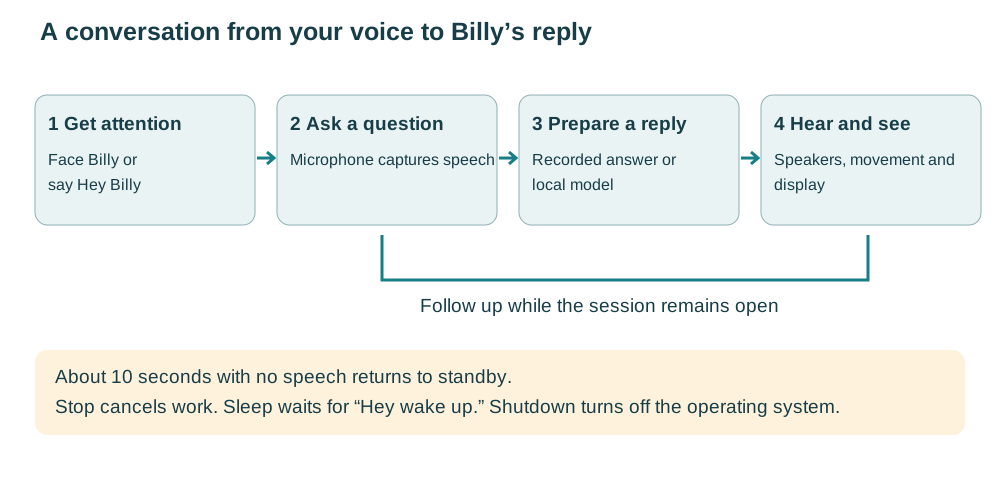
Face the camera for about 1.2 seconds, or say Hey Billy.
Watch for the listening state and ask a question naturally. Older runtime versions say “Go ahead”; the realtime profile disables that preliminary cue.
Wait for the reply. Ask a follow-up while the session remains open. About ten seconds without speech returns Billy to standby.
On the realtime runtime, speak during an answer to interrupt it. Say stop listening or goodbye Billy to end the session. Use Software Stop if necessary.
Face activation uses position, angle, confidence, and dwell time. It does not identify people. A continuously visible face does not repeatedly open sessions; look away or leave the view before trying again. Billy answers locally and cannot check live weather or current news. Check consequential answers independently.
Sleep without shutting down
Say “Hey Billy, take a nap.” Billy stops speech and movement, pauses face engagement and idle invitations, and listens for “Hey wake up.” The screen shows SLEEPING. After waking, ask your question; you do not need another “Hey Billy” first. Sleep is quiet standby: the Pi and microphone remain powered. It can survive a restart. [P3]
Optional songs
On a release with the prepared song library, ask “Hey Billy, sing me a song.” Billy selects a song and can coordinate motion and screen content. For reliable cancellation use the front button or Software Stop. Do not rely on spoken interruption during songs: some playback paths release the listening device. If the song files are absent or there is an audio error, stop and contact Thomas rather than repeatedly retrying.
End of day
Use Software Stop. Disable face engagement and the listener, and switch off motor power.
Hold the front button for three continuous seconds (or press it three times quickly), or run sudo shutdown -h now on the Pi.
Wait for the Pi to halt before removing its power. Restart using the startup method marked for this unit. Voice wake works only in sleep mode; wake from a full shutdown depends on Pi firmware and the installed power arrangement. Do not assume the front button can restart a halted Pi.
The front button is a stop and shutdown control, not a conversation trigger. One click requests Software Stop after the click-detection window (about 0.75 seconds). Three quick clicks request shutdown; holding for three seconds also requests shutdown. Its wiring occupies GPIO3; do not enable I2C1 on that pin. [P2]
3 Identify the installed system
The web service owns the current realtime conversation loop. Do not also start the older booth loop or a second web process: they can compete for audio, camera, port 8080, or the motion lock. The example project path below is the documented Pi path; confirm it from the service before relying on it.
Read WorkingDirectory and ExecStart in the service definition. Work from that directory and use its virtual environment. On a staged deployment, the current link identifies the selected release; the API’s realtime.release and realtime.ready identify the resident runtime and readiness. A selected symlink alone does not prove healthy activation.
Source
Meaning
config/billybass.yaml
Local baseline: mouth channel A, body channel B, relay GPIO26. Some settings differ from the installed release; use its configuration for maintenance.
config/realtime.yaml
Staging overlay for resident audio and recognition. Its default Piper model differs from the installed Kokoro voice. Preserve the active device settings and approved voice.
docs/REALTIME_CONVERSATION.md
Historical deployment account. The Pi currently reports hearing-model-20260924-01; do not treat the older release name as current.
Older README and bring-up prose
Some passages describe Kokoro, reversed channel assignments, mock-only motion, and card workflows. Do not apply those passages as current instructions.
4 Developer UI and function tests
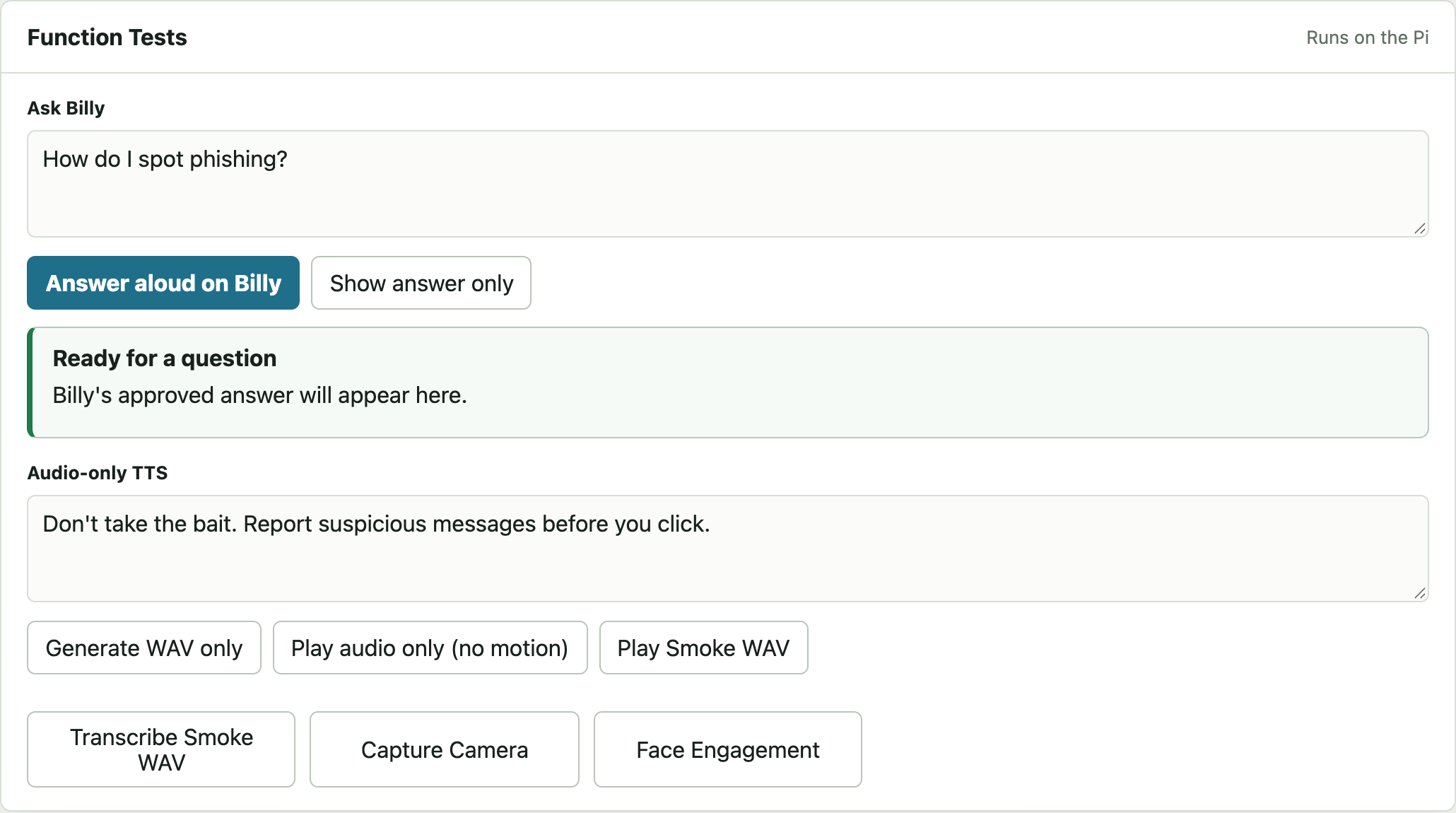
Figure 1. Function Tests separates silent answers, speaker playback, synthesis, and recognition. Reference screenshot of the installed release UI, disconnected from hardware; loading labels and empty fields are not live readings.
Control
How to use it
What success establishes
Refresh
Refresh status first.
Current service reporting; not a physical test.
Deep Check
Use while idle after basic status. Stop preview if camera is busy.
Slower model/camera checks; can contend with active interaction.
Show answer only
Type a question under Ask Billy.
Answer generation without speaker or motor proof.
Answer aloud on Billy
Use a short question. Listen at the fish.
Speaker path and answer playback; this typed path does not move the motors.
Generate WAV only
Enter text under Audio-only TTS.
A synthesized audio file, not audible playback.
Play audio only (no motion)
Play a short typed line.
Speaker output independent of mouth movement.
Play Smoke WAV
Use the existing smoke clip.
Existing-file playback; does not test new synthesis.
Transcribe Smoke WAV
Run the existing recording through recognition.
File transcription, not live microphone capture.
Capture Camera / Face Engagement
Use one still check while camera is available.
Capture or detector result; not automatic face activation.
Brain Status
Expand the collapsed panel.
Component status; review missing models and runtime errors.
Activity Log / Clear
Read the error around the failed action. Clear only resets the displayed log.
A command result; accepted commands still need observation.
Use this order when diagnosing a full conversation: silent answer → audio-only line → live mic recording → spoken answer → motion. This keeps a faulty microphone from being confused with a model or speaker problem.
The console can actuate hardware and edit content. Keep it on a trusted LAN; do not forward port 8080 to the Internet. This manual’s screenshots show actual HTML/CSS copied from the installed release on 24 September 2026, with application scripts disabled so no test command was sent.
5 Microphone listening and volume
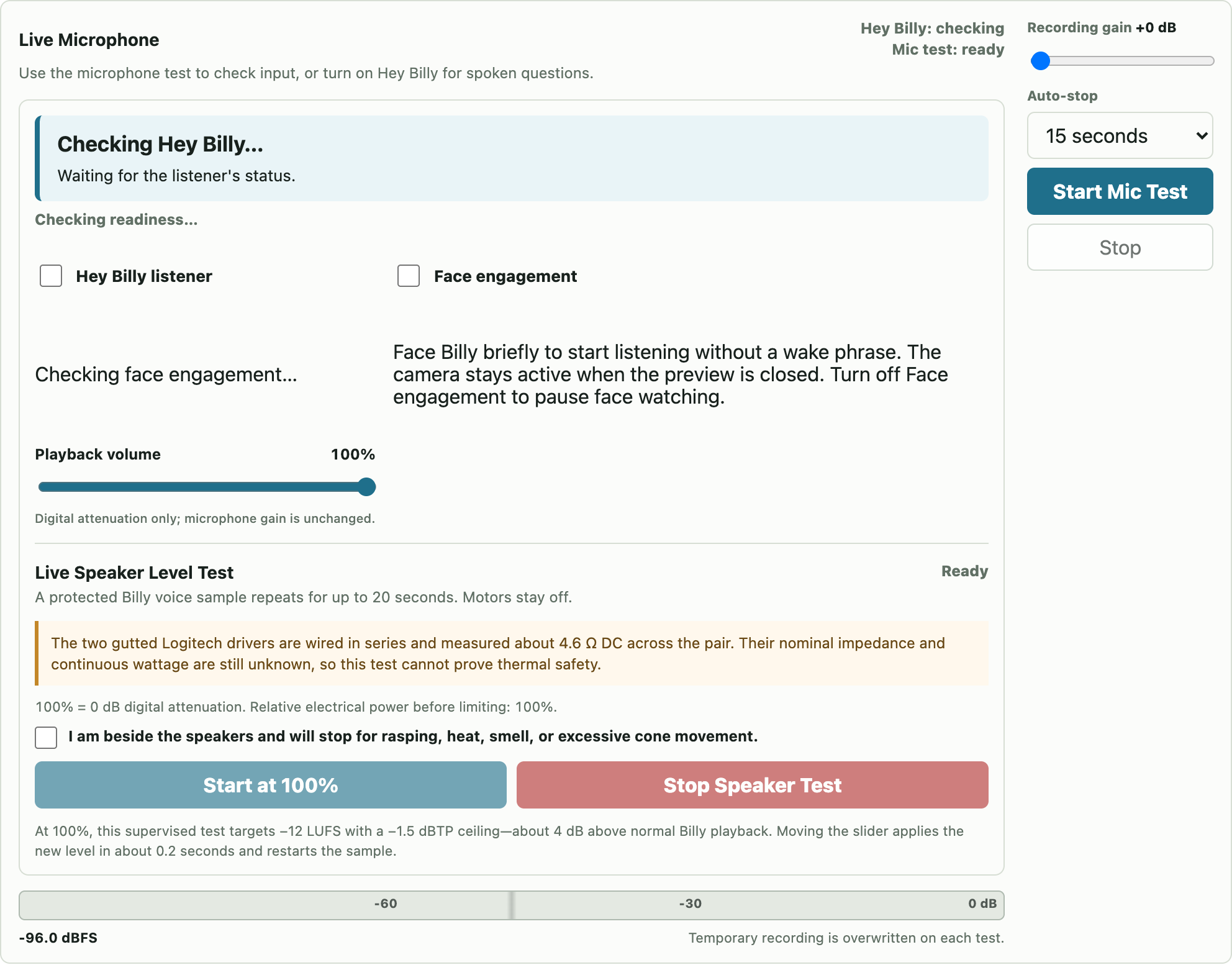
Figure 2. Listener toggles, playback volume, speaker test, and microphone recording controls. Reference screenshot of the installed release UI, disconnected from hardware; loading labels and empty fields are not live readings.
Check the microphone
Pause automatic conversation if it interferes with testing. Choose a short Auto-stop interval and start at Recording gain +0 dB.
Select Start Mic Test. Speak from the intended visitor position. Watch the level meter; it should rise with speech and fall in quiet.
Stop the test and play the recording in the browser. Browser playback comes from the computer’s output, not necessarily Billy’s speaker.
If the recording is quiet, raise recording gain in small steps. If it sounds harsh or stays near 0 dBFS, reduce gain or move back.
Stop the test before returning to conversation. Confirm listener readiness returns.
The meter’s recording gain is a diagnostic setting, separate from playback volume and the runtime’s speech-recognition gain. The temporary recording is overwritten by the next test. Do not use a mic test as a reason to leave visitor recordings around.
Set speaker level
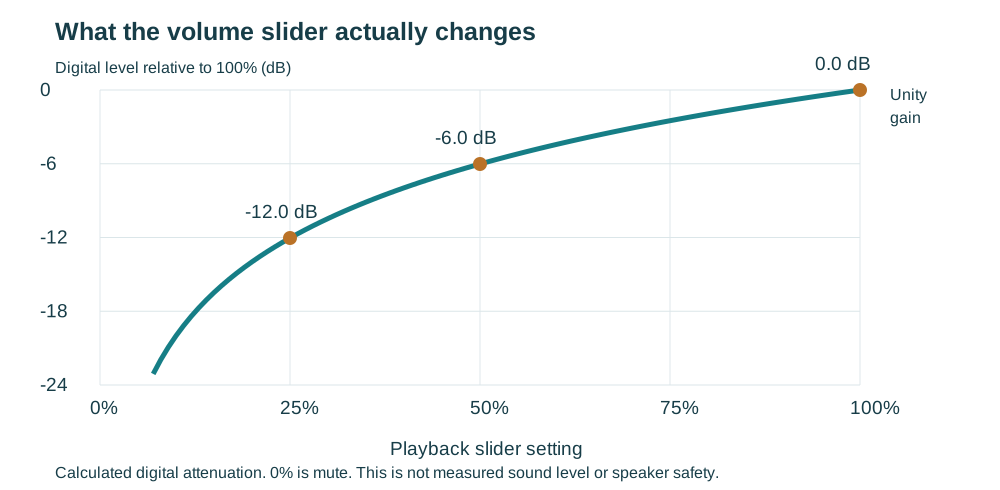
Playback volume is digital attenuation from 0 to 100%; it does not change microphone sensitivity. The value persists in run/playback-volume.json. At 100% it supplies unity gain, not a measured safe acoustic level.
Start with a short audio-only phrase at a low slider setting.
For the dedicated Live Speaker Level Test, remain beside the speakers and check its acknowledgement. It repeats for at most 20 seconds.
Raise the slider only as needed. Use Stop Speaker Test promptly for distortion, heat, odor, clicking, or excessive cone movement.
6 Motion and Voice Lab
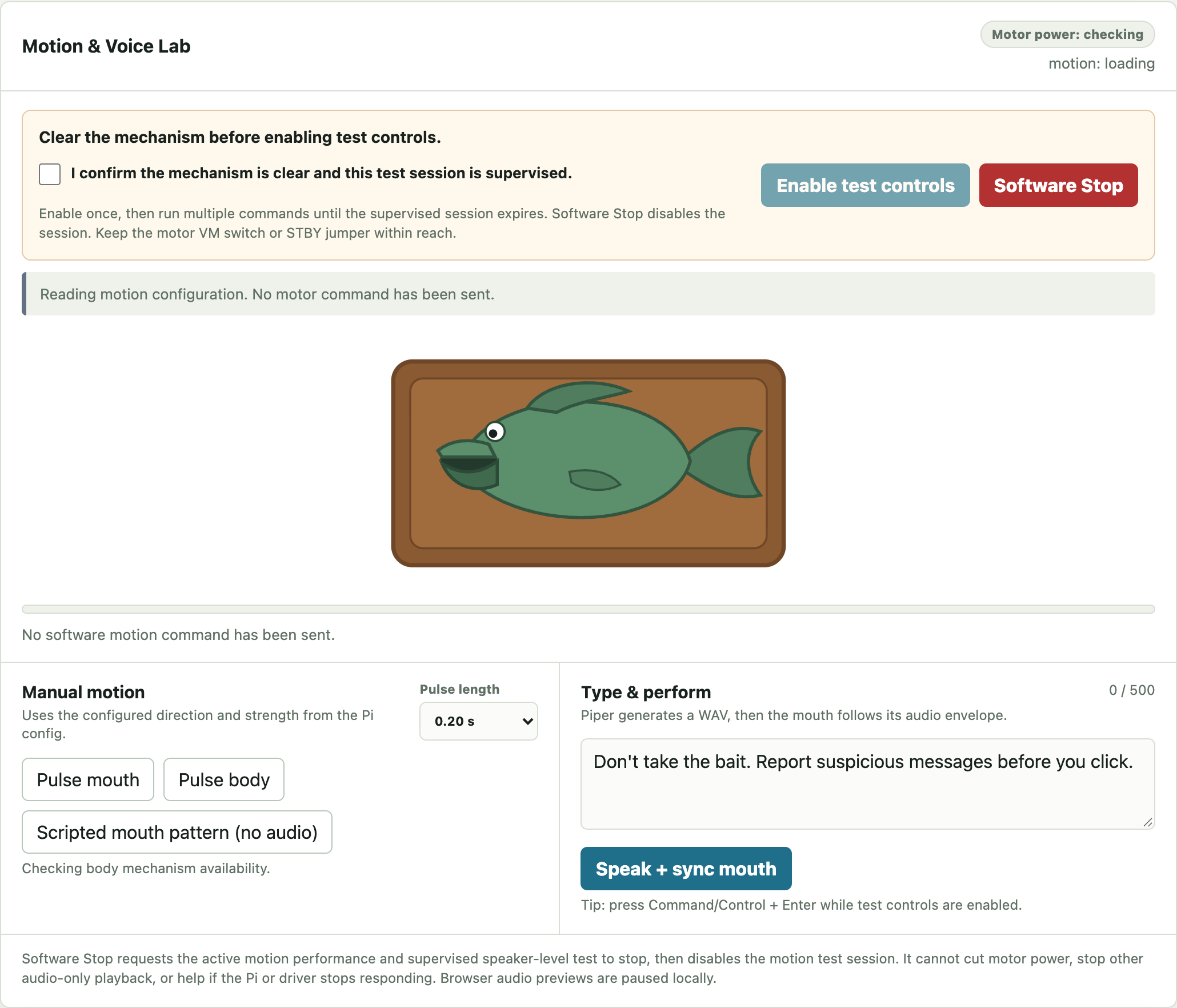
Figure 3. Supervised motion controls and Software Stop. Reference screenshot of the installed release UI, disconnected from hardware; loading labels and empty fields are not live readings.
Keep the mechanism clear and the physical motor-power switch within reach. Stop any separate legacy booth process. A GPIO ownership error is a reason to find the owner, not delete a live lock.
Check the displayed backend. A virtual fish moving under mock does not mean a motor moved.
Check the supervision box and select Enable test controls. This permits multiple bounded commands for up to one hour.
Choose a short duration and test Pulse mouth once. Observe the mouth; then test Pulse body once. Stop if the wrong mechanism moves.
Use Scripted mouth pattern (no audio) to separate mechanics from speech. It is real movement on a GPIO backend.
Enter a short line under Type & perform and use Speak + sync mouth. This path accepts up to 500 characters.
Select Software Stop or Disable test controls when finished. Software Stop cancels current work and ends the supervised session.
Installed configuration on 24 September
Connection and limit
Mouth
TB6612 A; BCM17/27; forward; strength 0.60; maximum continuous drive 0.20 s.
Body
TB6612 B; BCM23/24; forward; strength 0.60; maximum outward drive 0.20 s.
Body during speech
Current device uses coast mode and a short configured return pulse (0.05 s at 0.25 strength). Older local configuration uses brake hold and a 0.50 s outward ceiling; do not copy it over the installed profile.
Motor power relay
BCM26, active high through an NPN interface. Relay state is a software report, not a voltage measurement.
These values describe the read-only installed configuration snapshot. Confirm the active release’s values before diagnosing a changed assembly. Do not increase strength or duration to overcome a stalled linkage.
7 Camera and e paper
Camera
Select Start Live Overlay in Camera And Media. Choose Smooth for 640×480 or Detailed for 1280×720.
Frame a full face near the center at visitor height. Observe whether the overlay tracks the face and its angle.
Use Stop Live before changing cables or trying independent capture tools. Closing preview does not disable background face watching; use the Face engagement switch for that.
Test actual face-start listening after preview checks. A detection rectangle alone does not prove the stricter background activation gate passed.
The configured Camera Module 3 NoIR uses the imx708 sensor and a Pi 5 22-pin-to-15-pin Standard-Mini cable. Current configuration rotates the image 180 degrees. Inspect cable seating with all power removed. Do not repeatedly launch competing camera tools to solve a busy-camera error.
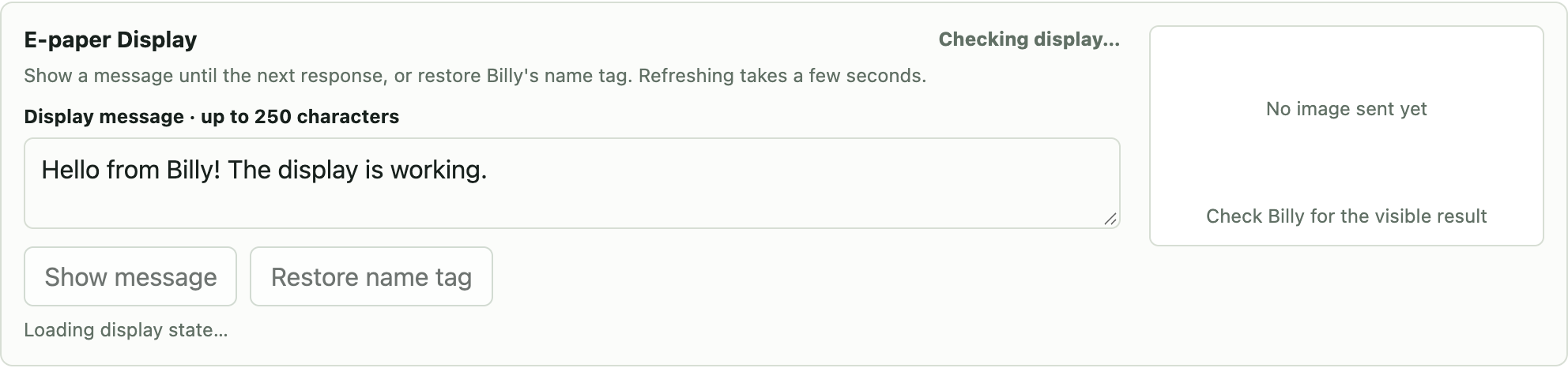
Figure 4. E-paper message and name-tag controls. Reference screenshot of the installed release UI, disconnected from hardware; loading labels and empty fields are not live readings.
E paper
Enter up to 250 characters and select Show message. This does not speak or move the fish.
Wait through queued work and refresh. The preview represents the last image sent by the driver; inspect the physical screen.
Select Restore name tag to restore “Hello, my name is Billy”. A manual message remains until another spoken response or restore request.
Speech normally mirrors text and returns to the name tag about ten seconds after playback ends. Realtime longer answers can page text. E-paper refreshes are slow and coalesced; repeated clicks do not make them faster. A retained image after power-off is normal and is not proof that the Pi is still running.
8 Edit questions and answers
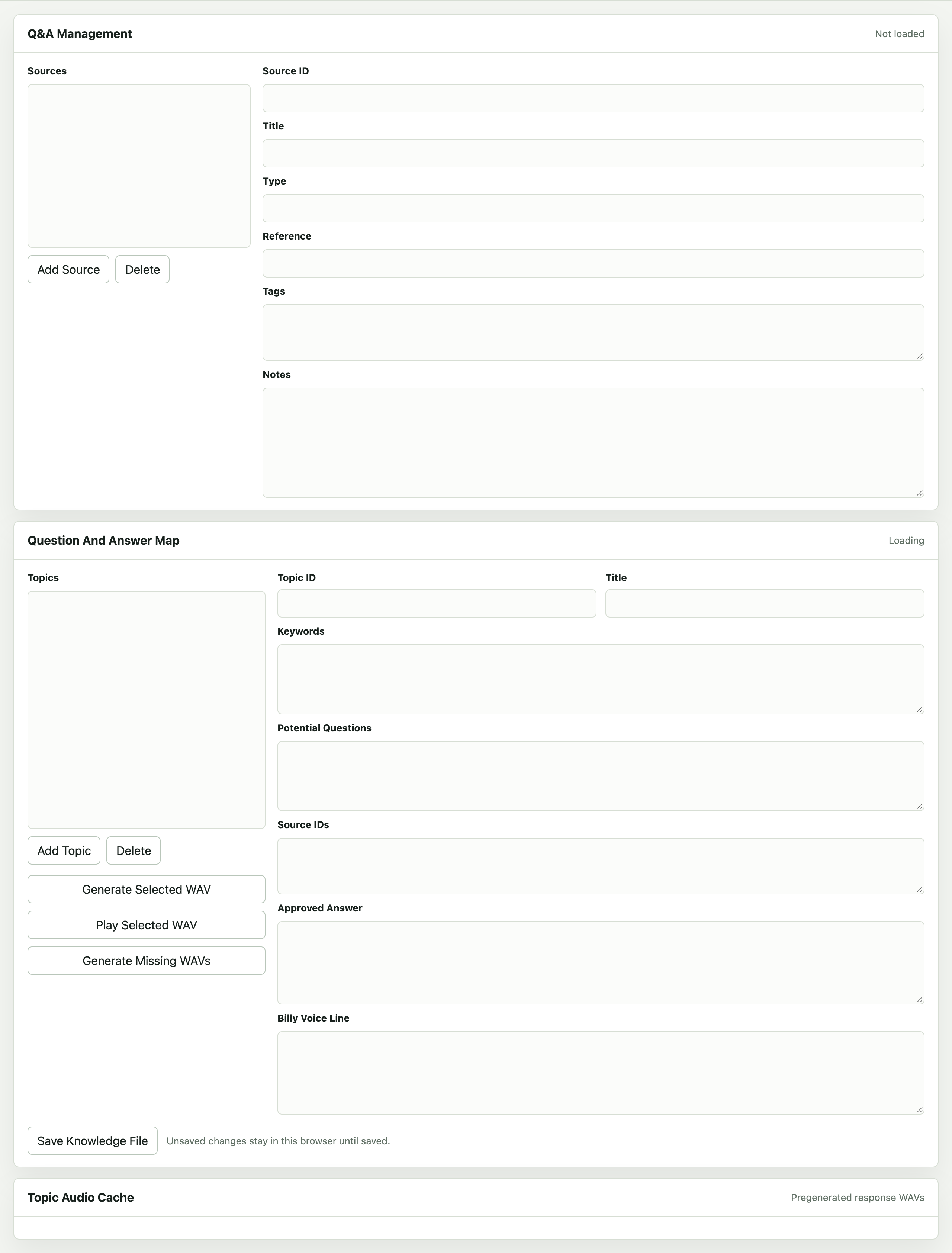
Figure 5. Q&A Management, sources, topic fields, and audio cache controls. Reference screenshot of the installed release UI, disconnected from hardware; loading labels and empty fields are not live readings.
Back up the knowledge file before editing: content/camping_2026/knowledge.yaml.
Open Q&A Management. Select or add a Source; give it a stable Source ID, title, reference, and notes.
Select or add a Topic. Fill in its stable Topic ID, title, keywords, likely questions, and matching Source IDs.
Write the Approved Answer as the factual reference and the Billy Voice Line as the spoken version. Check both for accuracy and pronunciation.
Select Save Knowledge File. Check the result in Activity Log before leaving the page.
After changing spoken text, use Generate Selected WAV, then Play Selected WAV and listen. Generate Missing WAVs fills missing cache entries; do not assume it refreshes every edited existing recording.
Return to Function Tests. Try the exact question and several natural paraphrases, first silently, then aloud.
Conversation mode can generate a response using reviewed guidance. Editing a topic does not force every answer to be a verbatim voice line. Prepared caches and the resident conversation voice can differ. Deleting topics or sources changes the saved content; retain a recoverable copy.
Older documentation describes QR cards and station completion. The current UI and source have removed that workflow; this manual does not present it as an available operator function.
9 Wiring overview
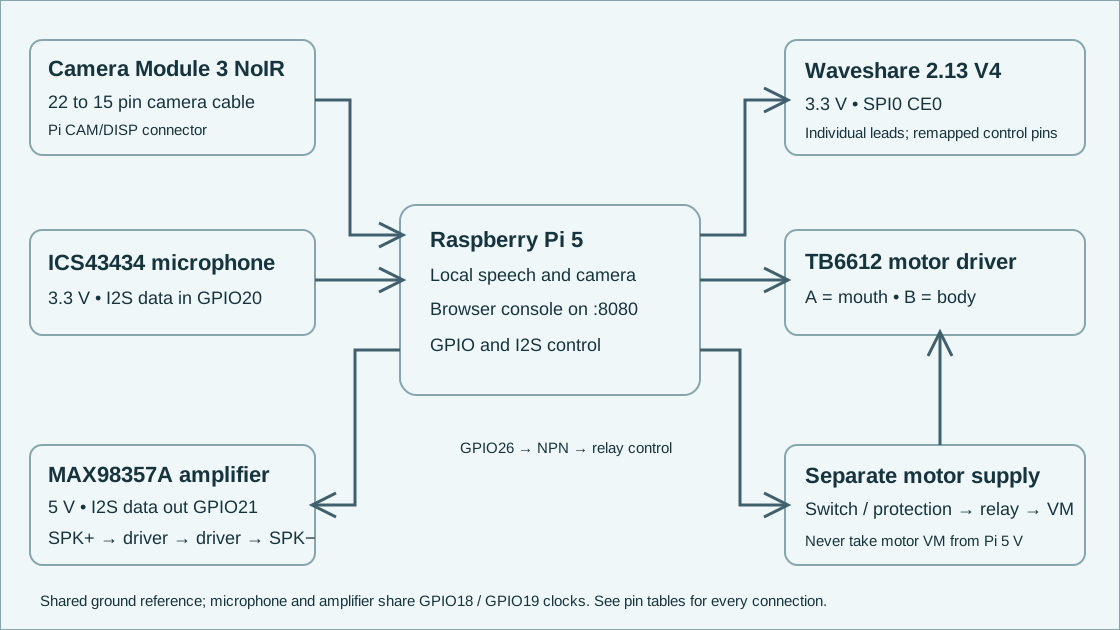
Figure 6. Functional electrical diagram. Relay contact/protection placement is a design relationship; verify the installed circuit before reconnecting it.
With all power disconnected, identify pin 1 using the Pi’s board marking or verified board pinout. Odd pins run 1, 3, …, 39 along one row and even pins 2, 4, …, 40 alongside them. The diagram below is a numbering aid, not an orientation view relative to the USB sockets.
Use terminal labels and continuity, not wire color alone. Photograph and label every connector before removal. Switch off both Pi and motor supplies before resistance measurements. Never connect an amplifier speaker output to ground: SPK+ and SPK− are both driven.
10 Connection tables
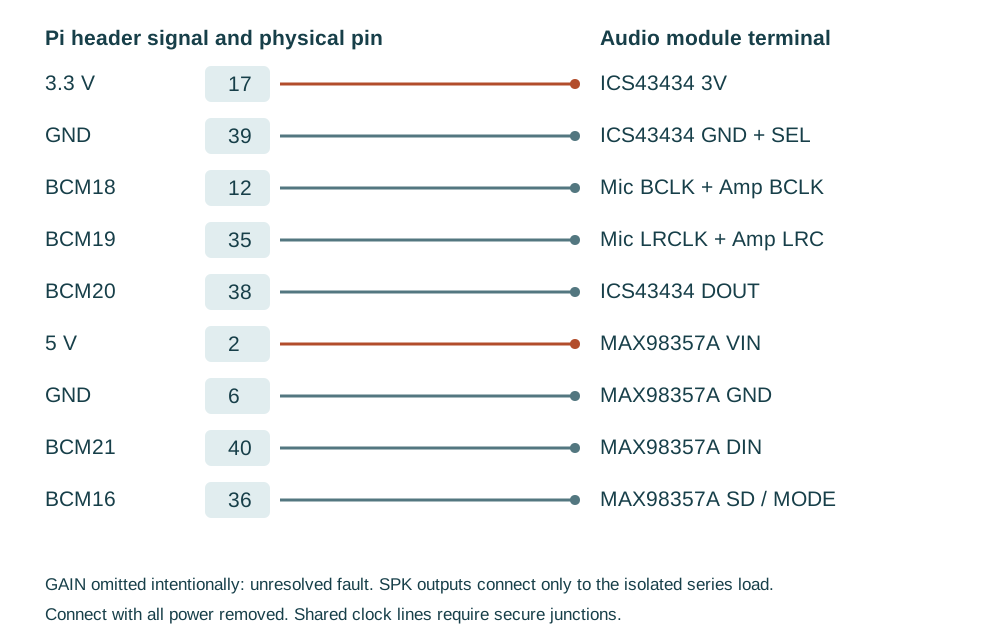
Custom harness reference [P5]; component principles [R2–R5]. Disconnect both power sources before wiring.
Historic working arrangement open; unresolved low resistance to VIN documented
Amp SPK+ / SPK−
No GPIO connection
Isolated series pair only
Speaker series circuit: SPK+ → driver 1 +; driver 1 − → driver 2 +; driver 2 − → SPK−. Verify the disconnected pair at its final two leads. Do not substitute parallel wiring or join either lead to Pi ground. Share the I2S clocks using secure junctions; mic DOUT and amp DIN must stay separate.
Motor driver and relay
Terminal
Connection
Purpose
TB VCC, PWMA, PWMB
Physical 1, 3.3 V fan-out
Logic power and PWM held high
TB STBY
Removable logic-enable connection; verify actual 3.3 V branch
Remove for isolation; never leave floating and assume enabled
TB AIN1 / AIN2
Physical 11 / 13 = BCM17 / 27
Current mouth channel A
TB BIN1 / BIN2
Physical 16 / 18 = BCM23 / 24
Current body channel B
TB AO1 / AO2
Verified mouth motor pair
Trace actual motor before attachment
TB BO1 / BO2
Verified body motor pair
Trace actual motor before attachment
TB logic GND, recorded black
Physical 34
Common logic ground
TB battery GND, recorded yellow
Separate motor supply negative
Motor return; shared reference through driver
TB VM
Protected separate motor rail via installed switching
Config records protected 6 V rail; measure and confirm suitability
Relay DC+
Physical 4, 5 V
Control supply only
Relay DC− and NPN emitter
Physical 30, ground
Control return
NPN base
Physical 37 / BCM26 through 1 kΩ
Relay drive
NPN base to emitter
10 kΩ resistor
Default-off bias
NPN collector
Relay IN
Pulls low-trigger relay input low
NPN terminal names are electrical functions, not left-to-right leg order. Identify the installed transistor and its pinout. Relay COM/NO/NC contact placement, fuse/current-limit values, and exact motor supply hardware must be verified on the assembly; the repository does not provide a complete construction drawing for that power path. The Pi relay supply must never become the motor supply.
Display and shutdown button
Lead or terminal
Physical pin
Signal
Display VCC, gray
Existing 3.3 V fan-out
Not 5 V
Display GND, brown
14
Ground
Display DIN, blue
19
BCM10 MOSI
Display CLK, yellow
23
BCM11 SCLK
Display CS, orange
24
BCM8 CE0
Display DC, green
22
BCM25
Display RST, white
15
BCM22
Display BUSY, purple
29
BCM5
Normally-open shutdown button
5 ↔ 9
BCM3 to ground; no external voltage
Use individual wires for the Waveshare V4; do not seat the stock HAT pin arrangement over the Pi. BCM17 and BCM24 are motor pins. Leave the unidentified stock sensor, small piezo, and unused second driver disconnected. The conversation arcade button is unassigned in current configuration.
11 Safe repair and component replacement
Tools and preparation
Use a suitable screwdriver, insulated labels, camera, multimeter, and correctly rated replacement connectors. Electrical motor diagnosis also needs a known protected supply and a way to measure voltage under load. Do not probe a crowded powered header with loose meter tips.
Record the symptom, current release, last change, and any error. Save configuration and take close-up photographs.
Use Software Stop, switch off motor power, shut down the Pi, and disconnect every supply. Verify power is absent before continuity tests.
Open the case without pulling the harness. Label both ends of each lead. Replace one component or connection at a time.
Check for bent pins, damaged insulation, loose solder joints, pinched wires, jammed linkage, and incorrect terminal labels. Do not force the jaw or body against a hard stop.
Compare the traced wiring with Section 10 and the active configuration. Correct the cause before fitting a new board.
Replacing parts
Part
Replacement procedure and acceptance
Microphone
Use the correct voltage-compatible I2S part; confirm its actual terminal order. Preserve 3.3 V supply, SEL channel, and shared clocks. Test a short recording before conversation.
Amplifier
Use a compatible MAX98357A module after resolving shorts and verifying board labels. Keep GAIN experiments suspended on the suspect unit. Reconnect the isolated series speaker load only after checking wiring. Test short speech at low volume.
Speaker
Confirm nominal impedance and continuous rating for the complete load before choosing a replacement. DC resistance alone is insufficient. Maintain an isolated two-wire load and listen for distortion during short speech.
Motor or driver
Trace each motor pair with power off; inspect suppression components before considering polarity changes. Match supply/current requirements and verify channel A mouth / B body. A single diode across a motor can make reverse drive unsafe. Do not treat any arbitrary fish harness pair as a motor.
Camera
Disconnect power, release connector latch gently, and fit the correct Pi 5 cable by its contact orientation. Check sensor detection and a still image, then face engagement.
E-paper
Match Waveshare 2.13-inch V4 and remapped control pins. Verify 3.3 V and SPI connections. Run one refresh, then inspect actual text.
Pi or SD card
Restore a verified system into a separate target, preserve the original card, check device overlays and service paths, and start with motor power isolated. A source archive is not a bootable OS image.
Return to service in stages
Unpowered: check polarity, intended continuity, and absence of a hard short. Do not infer a fault from one capacitor-charging resistance reading.
Pi only: keep motor VM off and STBY disconnected. Confirm stable boot and no current undervoltage indication.
Audio and display: test microphone, a short quiet spoken phrase, one camera capture, and one e-paper refresh separately.
Motor logic: with motor supply still off, confirm the configured GPIO mapping and default-off relay behavior.
Motor power: use the verified protected supply, clear the linkage, then test one bounded channel at a time with its physical disconnect ready. A stall, hum, heat, or collapsing rail means stop and investigate.
Full interaction: hear a spoken answer, observe synchronized mouth and body return, interrupt speech, test Software Stop, and verify idle return. Record observations before allowing unattended operation.
12 Troubleshooting
Symptom
Check first
Next action
Console will not open
Joined to BillyBass-Service; http://10.42.0.1:8080; Pi booted
Stay connected despite the No Internet message; check hotspot service. Do not launch a duplicate server.
Ready never appears
Model paths and audio errors in journal
Check active release and device availability. After a failed update use that release’s matching rollback procedure.
No response to Hey Billy
Listener switch; mic recording; current interaction state
Stop mic/speaker tests, then verify readiness. Check recognized phrase before changing model prompts.
Both ALSA lists should expose the shared Google Voice HAT-compatible card. The legacy ALSA name is sndrpigooglevoi; the realtime device match is snd_rpi_googlevoicehat. One googlevoicehat-soundcard overlay owns the shared I2S controller. Do not add competing amp-only or microphone-only overlays.
If status says asleep, wake Billy before diagnosing blocked test controls. Sleep is intentional and can survive service restart. Capture logs before restarting. Once the mechanism is safe, an ordinary service restart is sudo systemctl restart billybass-web.service. Confirm Ready afterward and repeat a short physical interaction test.
13 Backup and recovery
Make a private backup before changing content, software, or hardware configuration. Run from the deployed project with its Python environment, and keep the resulting archive and checksum off the Pi as well as locally.
Creation defaults to ~/billybass-backups. A custom destination must be outside the source project and not an ancestor of it. Existing destinations must belong to the operator with mode 0700. Archives can contain .env credentials; keep them private.
The helper selects source, configuration, models, content, persistent audio, selected runtime data, and SQLite snapshots. It verifies sizes and hashes. It excludes virtual environments, logs, transient recordings, and Git. It is not a complete SD-card image or full realtime deployment backup: selected paths do not automatically capture service unit definitions, all release recovery records, or the native build directory. Release symlinks to shared files outside a selected root may be rejected.
Record the running release ID, resolved current path, model/voice identity, and systemctl cat output for the web, LLM, and shutdown services.
Verify the helper archive and compare its reported SHA-256 with the original sidecar after copying.
Keep a separate verified SD image or complete offline runtime recovery copy including native audio dependencies, release records, and OS configuration. Do not call recovery complete until a spare target boots and works.
Restore into a new empty private directory with restrictive permissions. Inspect the verified archive before extraction; preserve the existing installation.
Recreate dependencies for the Pi architecture. Check device configuration with motor backend set to mock and body disabled in the recovery copy. Run local checks there.
Install or select the recovered runtime deliberately; confirm readiness and repeat the staged hardware tests before putting it back into service.
14 Software maintenance
Do routine development on a separate checkout or staged release. Do not edit the active runtime while it serves visitors. Use the deployed base as the source of device settings; the Mac checkout alone does not establish the installed wiring or voice.
Local verification
uv run --with-requirements requirements-dev.txt ./scripts/check_local.sh
This hardware-free gate exercises software with mock motion. It cannot prove speaker sound, wiring, or mechanical behavior. scripts/preflight.py is also read only, but its older readiness policy may conflict with the accepted real-motion configuration; inspect a reported failure rather than resetting working hardware just to obtain a green report.
Subsequent realtime updates
Follow REALTIME_CONVERSATION.md to stage from the installed current release. Preserve the actual device settings and approved voice hashes.
Prepare the locked environment/native library, run the staged tests, verify model startup, and seal the release. Audition any changed voice before marking it approved.
From the verified staged release directory, use the subsequent-upgrade command below. It checks the installed base and readiness and restores the old target if activation fails.
sudo .venv/bin/python scripts/upgrade_realtime.py "$PWD"
# To undo this subsequent upgrade, run from that same release directory:
sudo .venv/bin/python scripts/upgrade_realtime.py "$PWD" --rollback
After activation, check the expected API release ID and realtime.ready: true, service restarts, journal errors, and power health. Then test a spoken question, follow-up, interruption, mouth synchronization, e-paper, and return to idle. A sealed release is not necessarily active.
activate_realtime.sh and rollback_realtime.sh are the initial migration path. They are different from subsequent upgrades; the initial activation script deliberately refuses existing managed-service recovery state. Do not choose a rollback script merely because its filename contains “rollback”. Match it to the operation that created the failed release.
15 Maintenance record and source map
Keep one entry per change. This turns future repair into comparison against an observed working state.
docs/WEB_TEST_CONSOLE.md — historical card/voice passages require care
Backup implementation
scripts/backup_project.py; docs/EVENT_BACKUP.md
Evidence priority for a repair: actual traced assembly and measurements → active release configuration and code → current checkout → historical notes. This manual resolves the old reversed motor-channel prose using the current configuration’s explicitly recorded physical mapping. It does not certify a rewired assembly.
16 Understand the behavior
Figure 8. Conceptual conversation flow, not a timing measurement. See sections 2 and 3. [P1, P3]
Why some answers take longer
A prepared answer can reuse an existing recording. An unfamiliar question may need speech recognition, answer generation, and new speech synthesis. That extra work can create a noticeable pause. A changing status message is more useful than an assumed fixed response time. No latency benchmark or new listening test was performed for this edition.
Figure 9. Calculated curve: gain = slider / 100, attenuation = 20 log10(gain). At 0% playback is muted. This describes digital signal amplitude, not perceived loudness, sound pressure, power rating, or safe listening duration. [P4]
Three different kinds of quiet
Action
What remains running
How to continue
Stop
Pi and services remain on. Current work is canceled.
Check readiness and start a new interaction.
Sleep
Pi and microphone remain on for wake recognition. Face greetings pause.
Say “Hey wake up,” then ask a question.
Shutdown
The operating system halts. E-paper may retain an image.
Use the startup method confirmed for this unit; voice wake cannot work while shut down.
17 Plain language glossary
Term
Meaning for this project
Developer UI / console
The webpage at http://10.42.0.1:8080 while joined to BillyBass-Service.
Release
A particular installed version of the software and its configuration.
Ready
The runtime finished its startup checks; it is not proof that every physical part works.
STT / ASR
Speech-to-text / automatic speech recognition: turning your voice into words.
TTS
Text-to-speech: turning words into generated audio.
LLM / Ollama
The local answer-generating model / the program that runs it.
Prepared audio / cache
A stored recording that can be reused instead of synthesized again.
GPIO / BCM
Pi electrical control pins / the signal numbering scheme used in software.
Physical pin
The actual numbered position on the 40-pin connector; it is not the same as BCM.
I2S / SPI
Digital connections used for audio / the e-paper display. I2S and I2C are different.
VM / STBY
Motor-driver power input / standby-enable input.
Mock
A simulation backend that does not drive the physical motors.
ALSA
The Linux audio interface used to access the microphone and speakers.
E-paper / e-ink
A display that holds its image without continuous power.
SSH / systemd / journal
Remote terminal access / service management / service logs. Maintainer tools.
Checksum / SHA-256
A file fingerprint used to check whether a backup copy changed.
Care between uses
Shut down and remove all power before cleaning. Use a soft dry cloth. Keep liquids, spray cleaners and lubricant away from the camera, microphone, screen, speaker and mechanism. Inspect exposed cables and mounting before use. Store dry, with no load on the moving parts. For shipping, protect the plaque and electronics and prevent the unit moving inside the box; do not wedge packing into the motor linkage.
18 References and support
The project sources define this custom wiring and behavior. Manufacturer references explain component principles; their stock wiring examples do not override Billy’s remapped harness.
Project evidence
[P1] Installed Pi snapshot, 24 September 2026. Read-only API state, resolved current release, active configuration and service status. Release: hearing-model-20260924-01. Configuration and software readiness were checked; wiring, audible playback and motion were not retested.
[P2] Front button implementation.src/billybass/shutdown_button.py and installed /usr/local/libexec/billybass-shutdown-button.py. One click: stop; triple-click or three-second hold: shutdown. The installed service was active.
[P3] Sleep behavior.docs/SLEEP_MODE.md from the installed release and src/billybass/web.py. Sleep keeps the wake listener running and persists in run/asleep.
[P4] Volume calculation.src/billybass/playback.py, playback_volume. Digital gain is percentage divided by 100. Figure 9 is calculated, not measured.
[P5] Wiring and service history.docs/PI5_TONIGHT_BRINGUP.md, installed config/billybass.yaml, and docs/REALTIME_CONVERSATION.md. Older prose contains superseded channel, voice and button settings; use the dated installed snapshot and verify the actual harness.
[P6] Offline service Wi-Fi.docs/SERVICE_HOTSPOT.md and scripts/install_service_hotspot.sh. Installed 24 September: AP active at 10.42.0.1, boot service enabled, forwarding blocked, local console HTTP 200. A real phone connection and offline cold boot remain shipping checks.
Manufacturer documentation
[R1] Raspberry Pi Getting started. Power and headless network basics. raspberrypi.com/documentation/computers/getting-started.html. Consulted 24 September 2026. Use a supply suitable for the Pi model; do not re-image the supplied Billy card as routine setup.
[R2] Adafruit MAX98357 amplifier pinouts.learn.adafruit.com/adafruit-max98357-i2s-class-d-mono-amp/pinouts. Consulted 24 September 2026. Both speaker terminals are driven; neither is ground. The documented minimum nominal speaker impedance is 4 ohms. Billy’s historical DC resistance measurement does not establish nominal impedance.
[R3] Adafruit I2S MEMS microphone pinouts.learn.adafruit.com/adafruit-i2s-mems-microphone-breakout/pinouts. Consulted 24 September 2026. Check the exact installed microphone model and terminal markings; Billy’s harness uses 3.3 V and a dedicated data-input line.
[R4] Waveshare 2.13-inch e-Paper HAT manual.waveshare.com/wiki/2.13inch_e-Paper_HAT_Manual. Manufacturer reference for the V4 panel; web page could not be fully retrieved during preparation. Match the exact monochrome V4 hardware and retain Billy’s remapped pins.
[R5] SparkFun TB6612FNG hookup guide.learn.sparkfun.com/tutorials/tb6612fng-hookup-guide/all. Manufacturer learning reference for driver terminals and standby; full page access was restricted during preparation. It does not specify the assembled Billy motor rail or protection.
Include the edition date, release name if visible, symptom, last change, and a clear photo of the problem. Stop using the unit if a connector is damaged, movement binds, or anything overheats.